Open format v1.0Workbench appAgents over MCPImport and export adapters
The standard format
for title plants.
titlebase is the open format and the workbench for teams that build, convert and maintain title plants, across every system and format they come in.
- 01
The format
An open, versioned standard for exporting, creating and changing title plants. One file per plant.
plant.titlebase - 02
Workbench app
Native and GPU rendered. Views, an inspector and Activity, for plants of millions of documents.
tbase open plant.titlebase - 03
Agents
Agents do the work over MCP. The app updates live, and every change can be undone.
tbase mcp - 04
Command line
Headless, for scripts and batch runs. JSON out, and nothing ever prompts.
tbase docs search --type WD
01 Speed
Six million documents.
Twenty-five seconds.
We read every row of a 6.3 million document plant, parsed it and wrote it back with titlebase's own writers. Every row came back byte-identical. It took 25 seconds on one Mac Studio.
- Documents in one file
- 6,298,723
- File size
- 16GB
- Every row rewritten
- 25.1s
- Rows byte-identical
- 100%
Index it once. Search it in milliseconds.
titlebase builds a search index beside the plant, never inside it. On the same 6.3 million document plant, every indexed filter and sort we measured returned its first page in 42 ms or less.
- Index 6.3M documents
- 79s
- Indexed searches, first page
- 0.3to42ms
- Whole plant by filed date, first page
- 0.3ms
Round trip on eight real plants
Release build, files opened read only. Plant names withheld.
| Plant | Size | Documents | Documents, to scale | Re-emit | Identical |
|---|---|---|---|---|---|
| Plant 1 | 579 MB | 138,945 | 1.4 s | 100% | |
| Plant 2 | 769 MB | 231,698 | 2.4 s | 100% | |
| Plant 3 | 762 MB | 290,381 | 1.8 s | 100% | |
| Plant 4 | 1.4 GB | 291,021 | 3.3 s | 100% | |
| Plant 5 | 1.1 GB | 311,783 | 2.5 s | 100% | |
| Plant 6 | 1.6 GB | 695,042 | 3.8 s | 100% | |
| Plant 7 | 8.4 GB | 3,332,713 | 14.2 s | 100% | |
| Plant 8 | 16 GB | 6,298,723 | 25.1 s | 100% |
A second check writes a whole new file and compares every row and the schema. It came back identical on every plant it ran on.
Targets, met
Set on the 6.3M document plant before we wrote the code.
- Build the search indexTarget under 2 min79 s
- Any indexed filter or sort, first pageTarget under 100 ms42 ms worst
- Unindexed sort, first pageTarget under 1 s232 ms
02 Agents
Agents do the work.
You watch it land.
Connect Claude, or any agent that speaks MCP, with one command. It searches, fills and fixes records while the app updates live. Every change is logged in Activity under the agent's name, and any edit or whole run can be undone.
Ask in plain words
The agent works through the same commands the app uses. Every tool has a JSON Schema, so it knows exactly what to send.
Watch it happen
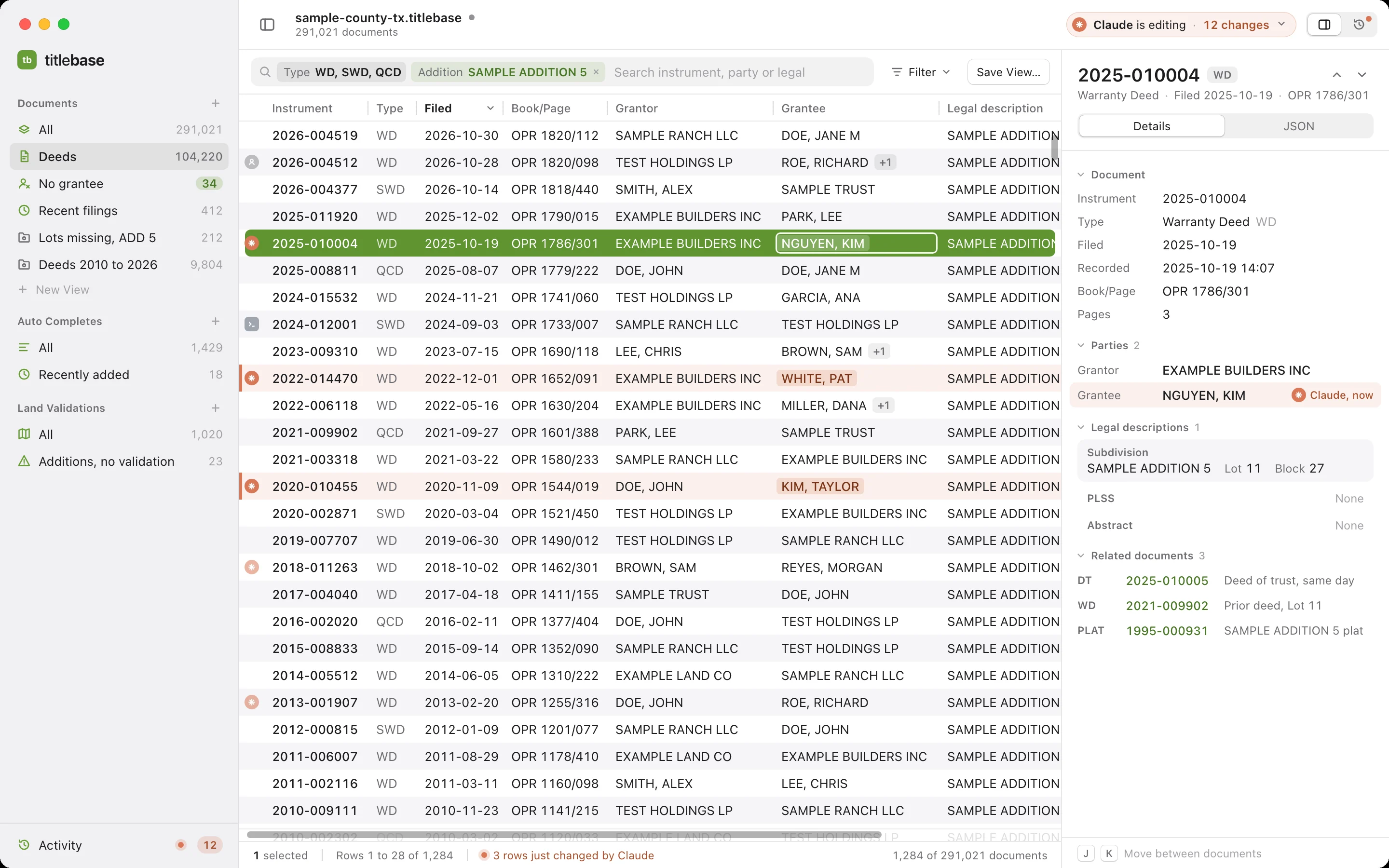
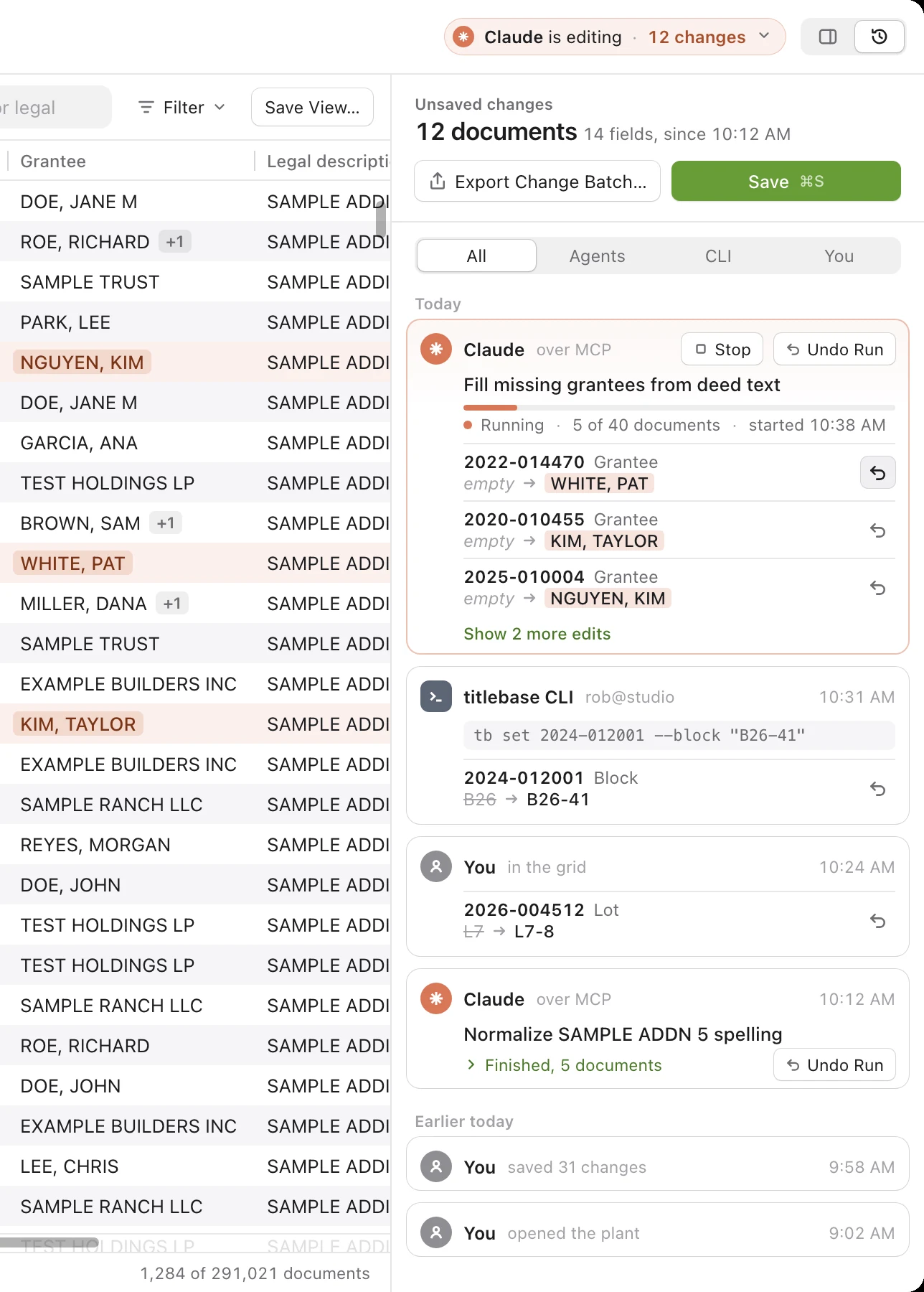
With the plant open in titlebase, agents write through the app. You see each change in the grid and in Activity as it lands.
Undo anything
Undo one edit, one document or a whole run. The plant file is untouched until you save or export a change batch.
Every change,
in one timeline.
Activity shows what changed, who changed it and how: an agent over MCP, a script on the CLI, or you in the grid. A running agent shows its progress and each edit it made. Stop it, undo a single edit or undo the whole run.
- Filter by agents, CLI or you
- Before and after for every field
- Save, or export only the changes as a batch
claude mcp add titlebase -- tbase mcp
# or bind it to one plant, so every tool knows the file
claude mcp add titlebase -- tbase mcp --file ~/plants/sample.titlebase

# then your agent calls tools. A real call and its result, trimmed:
→ docs_search {"instrument_type": "WD", "party": "DOE",
                "addition": "SAMPLE ADDITION 5", "limit": 3}
← {"indexed": true, "engine": "index",
   "documents": [
     {"id": 5, "instrument_number": "1994-001288", "instrument_type": "WD",
      "filed_date": "1994-11-02", "grantors": ["DOE, JANE"],
      "grantees": ["FIRST SAMPLE BANK"], "additions": ["SAMPLE ADDITION 5"]},
     ...
   ],
   "next_after_id": 80}
Read
10 tools- file_info
- index_status
- docs_get
- docs_list
- docs_search
- docs_related
- ac_list
- lv_list
- changes_list
- check_roundtrip
Write, logged and undoable
16 tools- docs_create
- docs_update
- docs_delete
- docs_image
- ac_create
- ac_update
- ac_delete
- lv_create
- lv_update
- lv_delete
- changes_undo
- changes_redo
- changes_revert
- changes_export
- file_save
- index_build
Plan and apply across a plant
4 tools- ops_plan
- ops_apply
- ops_undo
- lv_from_plat
03 Workbench app
A native workbench
for very large plants.
Written in Rust on GPUI, the GPU rendered UI framework behind the Zed editor. No browser and no web view. It opens a plant of millions of documents in about a second and shows rows before the index is built.
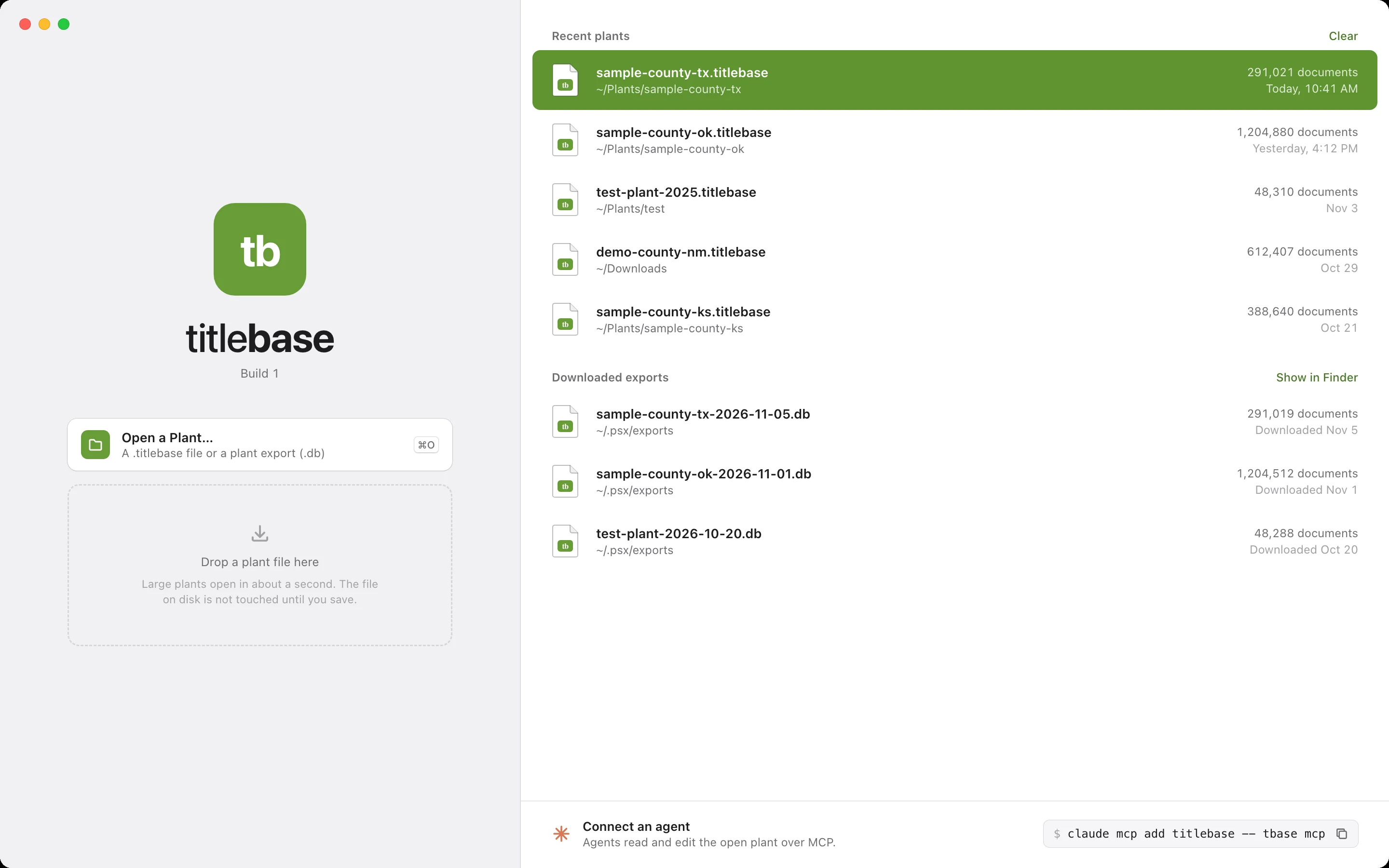
Open any plant.
Start working.
Open a .titlebase file or a plant export, or drop one on the window. Recent plants and downloaded exports are one click away, and an agent connects from the start screen with one command.
Views and filters
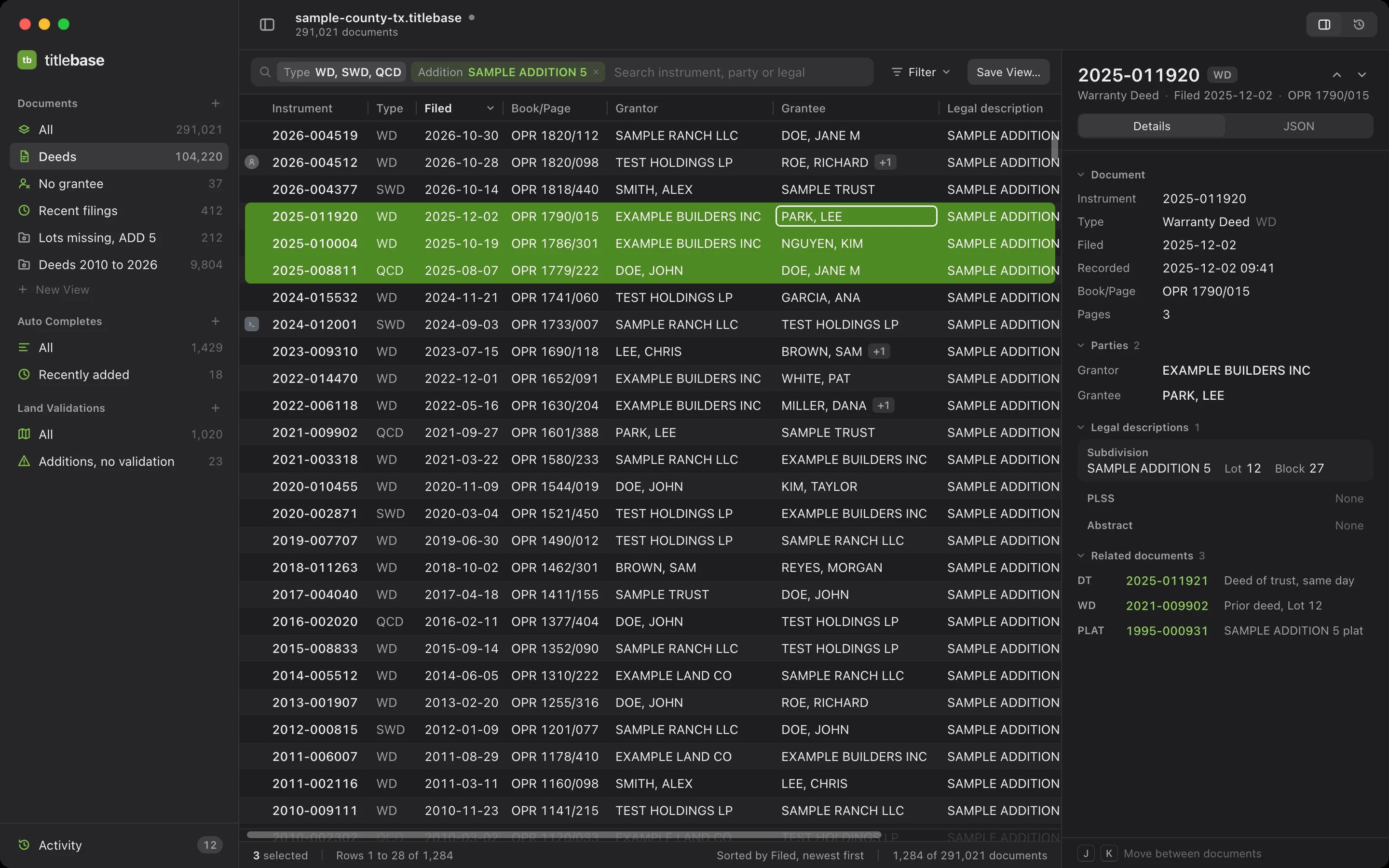
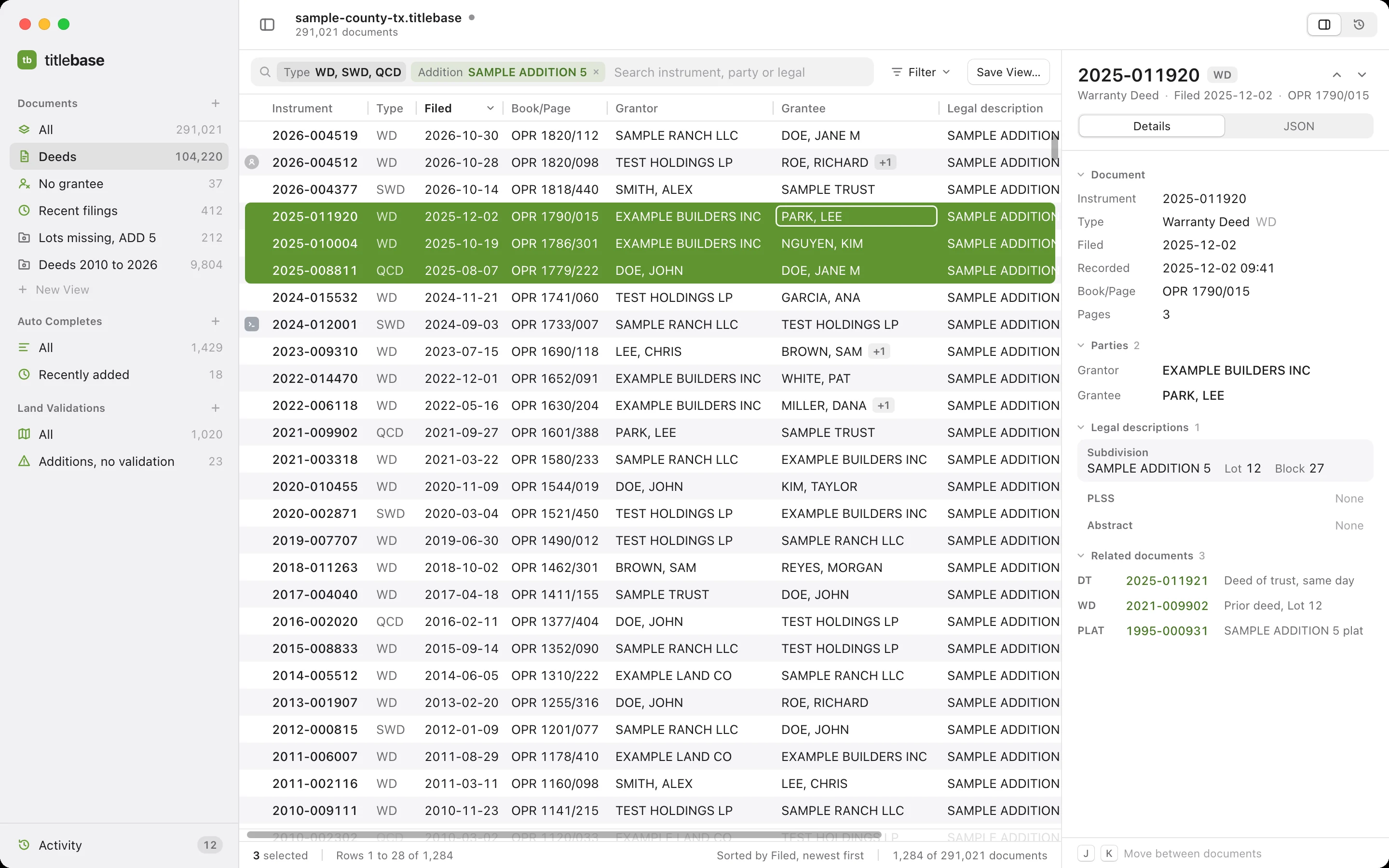
Preset views like Deeds, No grantee and Recent filings, plus your own saved views. Search with filter tokens for type, party, addition, lot and block, dates and book and page. An optional SQL drawer is there for advanced work.
Documents grid
Every column of a multi-million row plant, keyboard first. Sort, pin and hide columns. Multi-select and copy as TSV.
Inspector
Every field, every legal description, parties and related documents with click through, plus the raw JSON.
Auto completes and land validations
Browse and fix the plant's vocabulary and plat validations next to the documents that use them.
The source stays safe
The file you open is never changed until you save. Edits are journaled beside it, and saving in place keeps a backup.
Day and night
A calm light theme for long keying days and a dark one for late nights.
04 Import and export adapters
Plants in.
Plants out.
titlebase includes import and export adapters for PropertySync and a host of other industry standard formats. Bring a plant in from one system, clean it up, and send it out to another, all through one standard format.
Open plant exports as they are
A PropertySync plant export opens directly. Nothing to convert first.
Change batches
Save a clean, verified plant, or export a batch of only what changed: documents, auto completes, land validations, deletions and images.
Build new plants
Create an empty plant, inject records from a conversion source, and dump any table back to JSON.
Clerk index mapping
Map a clerk's index to the plant's own codes before records go in.
Snapshot compare
Compare two snapshots of the same plant, document by document.
PropertySync client
Sign in with your own account to download exports, look up live records and push batches.
05 The format
Open format.
Written down.
A titlebase file holds one whole title plant. The format is written down, versioned and open, so any team or tool can read and write it. Version 1 is PropertySync compatible: every PropertySync plant export opens as it is.
- DocumentsEvery recorded instrument, field for field
- PartiesGrantors and grantees, as recorded
- Legal descriptionsBy standard type: subdivision, PLSS, abstract, acreage, parcel
- Auto completesThe plant's vocabulary
- Land validationsPlats, replats and vacates by addition
- Change historyEvery edit journaled beside the file
- One file per plant. Copy it, back it up, hand it over.
- Byte faithful. An edited row looks exactly like the original. A row you did not touch is never rewritten.
- Room to grow. Extensions live in reserved, optional tables. Indexes and the journal live beside the file.
- Toolkits for developers. A Rust library reads and writes the format. The CLI and MCP server script it.
06 Mass updates and land validations
Change a whole plant.
Undo any run.
Start from any view or selection, or ask an agent. titlebase plans the change and shows counts and a before and after for sample documents. Apply runs in one transaction, and every run is logged in Activity, so you can undo it later.
Rename addition
"SAMPLE ADD 5" → "SAMPLE ADDITION 5"
- Documents
- 141
- Auto completes
- 0
- Land validations
- 0
Reindex and reformat
Normalize case, spacing, dates and instrument number formats across every document.
Legal structure changes
Move and restructure legals into standard types: subdivision, PLSS, abstract, acreage and more. Define your own with the legal builder.
Find and replace
Rename a value, set or clear a field, or run a regex on any path. Split, merge and flatten parties.
Auto complete cleanup
Merge, rename and dedupe vocabulary, and see every document a change touches.
Land validations from the plant
Generate land validations from plat documents and the lot and block usage across an addition. Review, adjust, then apply.
Recipes
Save a set of changes and run it again on the next snapshot of the same plant.
07 Command line
Every action,
from a script.
tbase runs headless. Every command takes the plant file first. Add--json and you get one JSON document on stdout and nothing else. Every edit is journaled beside the plant and can be undone. Nothing ever prompts.
tbase file infoSize, page size and row countstbase index buildBuild the sidecar search indextbase docs searchInstrument, type, dates, parties, legals, book and pagetbase docs updateSet or remove any field, journaled- Auto completes and land validations
tbase ac,tbase lv tbase changes listEverything changed since you opened it- By run or by operation
tbase undo,tbase redo tbase saveA clean, verified plant filetbase changes exportA change batch of only the changestbase check roundtripProve a byte-identical rewrite
tbase index build sample-county-tx.titlebase
built sample-county-tx.titlebase.tbase/index.db
  documents  2400 (88166/s)
  parties    4800
  legals     2400

tbase docs search sample-county-tx.titlebase --addition "SAMPLE ADDITION 5" --lot 4 \
    --sort filed_date --direction desc --limit 3 --count
   142  2026-000982    WD          727/573    2026-07-16  DOE, JANE -> GARCIA, ANA  [SAMPLE ADDITION 5]
   949  2026-001815    MTG        1004/361    2026-05-28  NGUYEN, KIM -> SMITH, ALEX  [SAMPLE ADDITION 5]
  1558  2022-000359    DT          519/010    2022-07-17  DOE, JANE -> SMITH, ALEX  [SAMPLE ADDITION 5]
3 documents
31 matches in all
(indexed: answered from the sidecar index sample-county-tx.titlebase.tbase/index.db)

tbase docs update sample-county-tx.titlebase 75 --set 'grantees.0.nameFirst=RICHARD A'
updated document 07e58eaf-5e22-04da-6941-01d32e8b3ec8 (row 75): /grantees/0/nameFirst
run 1, op 1
undo: tbase changes undo sample-county-tx.titlebase --run 1

tbase save sample-county-tx.titlebase --out sample-county-tx-edited.titlebase
saved sample-county-tx-edited.titlebase
  documents       2400 rows: 2399 unchanged, 1 updated, 0 deleted, 0 created
  landvalidations 4 rows: 4 unchanged, 0 updated, 0 deleted, 0 created
  autocompletes   11 rows: 11 unchanged, 0 updated, 0 deleted, 0 created
  verified        true
08 Release notes
What’s new,
every version.
Every release gets a note, newest first. Follow along by RSS or JSON feed.
Release notes appear here with each version.
Each note says what changed and what it means for your plants, in plain words. Subscribe to the feed to hear about every release.